Shortly after returning home from a recent journey, I discovered that ON1 software is releasing a completely free version of its NoNoise AI application. The giveaway runs only through July 30, 2026, and although ON1 offers these end‑of‑cycle freebies fairly often, this one is the latest 24.5 build—even if the “2024” branding suggests otherwise. Claim it before the deadline, and the license is yours to keep, making it a timely opportunity for anyone who wants cleaner cellpics without investing in a full editing suite. You can find the free version here, along with an offer to purchase the developer’s suite of processing tools.
I thought I’d give the tool a try, as the biggest advantage of ON1’s NoNoise AI is that it works on both JPEG and RAW files. Lightroom Classic’s Denoise remains an excellent option, but it’s limited to RAW processing only. When I installed NoNoise AI, I discovered that the free standalone version still includes plugin integration for both Lightroom and Photoshop—handy for anyone already in the Adobe ecosystem. For this evaluation, I chose two images: one especially challenging and one more typical of an average vacation photo, both processed straight from mobile JPEG captures to see how well the tool handles real‑world noise.
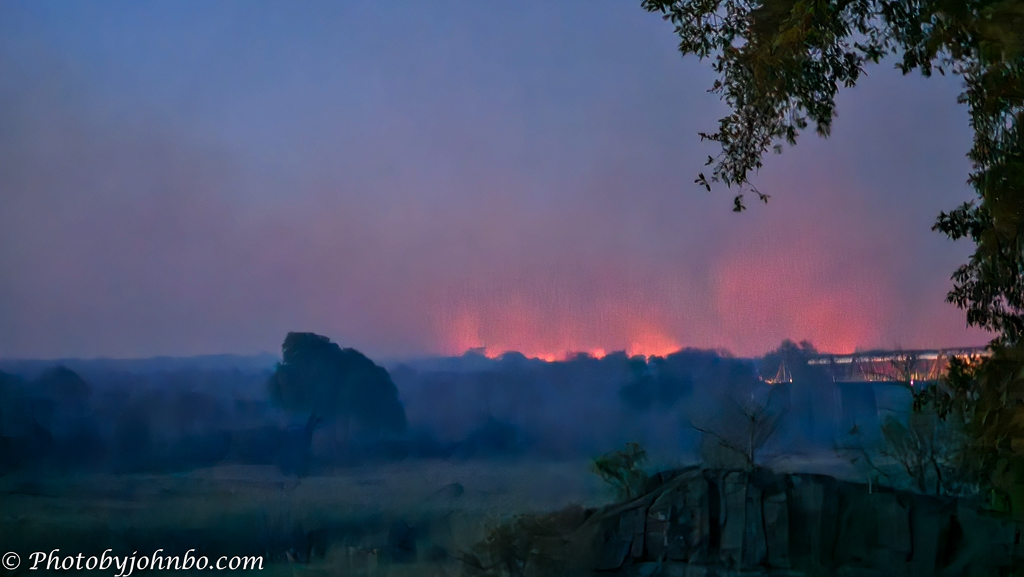
On our journey to Kruger National Park in South Africa, our accommodation was near a wildfire that threatened Skukuza Airport and damaged the terminal building’s thatched roof so badly that, when we departed a few days later, the terminal was closed for repairs. As the blue hour waned, the fire’s glow created an eerie scene that I captured with my Samsung Galaxy S23 Ultra. Auto‑ISO pushed the value to 2500, and the 1/8‑second exposure was heavily influenced by Samsung’s computational filtering, producing a painterly look that made noise reduction especially challenging.

The first thing I learned is that even on a 4K monitor, the differences are subtle. Viewed on this webpage, the improvement is essentially indistinguishable. For anyone who really wants to pixel‑peep, I’ve uploaded all versions to my Flickr site (link below), where you can download the full‑size images for closer inspection on your own equipment. I included three files: the untouched original, ON1’s automatic adjustment—which I found a bit heavy‑handed—and a manual edit using the three noise‑reduction sliders, which produced the most natural and effective result. I also shared a screenshot of the before/after comparison on Flickr. For the manual version, I settled on Luminance 25, Enhance Detail 80, and Color 30, a combination that kept the painterly look intact while reducing the worst of the noise without smearing fine detail any more than Samsung’s computational filters already had.

A more typical vacation photo can also benefit; even a single shot at a clean ISO 64 baseline, like this image of the Krimpen aan de Lek water tower taken near Kinderdijk in the Netherlands, can be improved. The automatic AI settings of Luminance at 100, Enhance Detail at 50, and Color at 100 are overly aggressive. For this image, I set the Luminance to 57, Enhance Detail to 80, and Color to 26, then selected the 2024 model instead of the default 2024 – High Detail model.

Here’s a screenshot of the image magnified at 400% in the application. On the left of the vertical slider in the photo is the unprocessed sky and tower, and on the right is the version with noise reduction applied. Even in this zoomed-in view, the improvement is easy to spot: the manual settings smooth out the sky cleanly while preserving a natural texture on the tower’s brickwork. Viewed on a 4K monitor, the difference becomes even more apparent, with the noise reduction producing a noticeably cleaner and more natural result.
The biggest advantage of ON1 NoNoise AI works with JPEG files, though you can also run it on RAW images if you prefer it over Lightroom’s Denoise tool. Regardless of which editor you use, noise reduction needs to happen early in the workflow. Running it before cropping ensures the algorithm has the maximum amount of contextual pixel data to calculate its adjustments accurately. Applying it before lens corrections prevents the software from analyzing pixels that have already been digitally stretched, warped, or vignetted by Lightroom’s profile adjustments. For this comparison, I stopped processing the photos immediately after noise reduction, as any further edits would skew the results. Of course, both images could be improved with additional adjustments—but that’s for another day.
As I noted earlier, the images are available at the link below. For those who want to take a closer look, it’s best to download the files and review them on a 4K monitor. Even then, the Skukuza image shows a subtle improvement at 4K, while the sky surrounding the Krimpen aan de Lek water tower benefits much more noticeably from manual smoothing. If you’re interested in evaluating the application on your own computer, be sure to check ON1’s machine requirements first—its AI models lean heavily on GPU performance, and older or underpowered systems may struggle to run the tool efficiently.
While I have relied on Luminar Neo’s Noiseless module for mobile JPEG noise reduction in the past, testing this free version of ON1 shows it to be a superior option. It’s a solid addition to my workflow, especially for cellpics that need a gentle touch. Just remember that this free, unlimited software license is only available until July 30, 2026—after that, the offer disappears.
I invite fellow bloggers to join in by creating their own Cellpic Sunday posts. There’s no set theme. The first rule: your photo must be captured with a cell phone, iPad, or other mobile device. The second rule: link your challenge response to this post or drop a comment here with your link so others can find it. And remember, despite the name, there’s no penalty for sharing on a day other than Sunday.
John Steiner


[…] John’s Cellpic Sunday – 26 July […]
[…] John’s Cellpic Sunday […]
Lots of information here John. It is always good to get a freebie that works as well.
Here’s my Cellpic Sunday
I’ve already used the app on a couple of projects. Its default settings are too strong, so back off the sliders a lot if you decide to try it out.
Not much a chance. I don’t take serious photos with my phone. I probably take no more than ten photos a month. My camera is always with me
enjoy your Sunday, John 🙂
Trees in the park – Ladyleemanila
Thanks, LadyLee! You as well.
Wow, thank you for the rich details on removing noise with what sounds like a great free application (ON1 NoNoise). I appreciate the wise insights in your explanations, John. I always learn new tips for processing photos.
Thank you, Suzette! I’ve already used it in my workflow for those JPEG files that need some noise reduction.
Most excellent!
Thanks for the tip, John. Good results you got there.
It’s worth a look if the program fits your need and workflow.
Thank yu for the heads-up about this software. I usually use Topaz AI’s denoise function but have downloaded this to test it against that. I’ll let you know my verdict!
I’m interested in your results.
Will let you know
[…] I am still sharing photos from our Norway trip, these are taken with my IPhone 17 PRO, when traveling taking shots with the phone also works as a dairy. Joining in John’s Cellpic Sunday […]
[…] for Birds of the Week, Johnbo’s Cellpic Sunday and Lens-Artists: Summer […]
[…] John’s Cell Pic Sunday-2026.07.26 […]
Oh no, a wildfire! I read today morning that they are having a lot of that here in France and Spain since the last few days.
Thanks for the tip. I’ll take a look if ON1 is useful for me. My entry here: https://flightsofthesoul.wordpress.com/2026/07/26/water/
Wow, John, half of what you wrote I doubt I understood much 🙂 🙂 Is it part of a suite of other photo tools? I do take a LOT of cell phone pics, and noise is a problem. I’m exited to see the Crossing on the Lake! (My limited Duolingo Dutch translation). I will check out this feature. Meanwhile here is mine this week:
https://secondwindleisure.com/2026/07/26/sunday-stills-mid-summer-reflections/
It is part of a suite. They entice you for a free version of one of the tools, and until the end of the month offer a special price on the rest of the set.
Thanks, I’m going to try it out.
[…] John’s Cellpic Sunday […]
That’s really impressive John and what a difference with the Krimpen aan de Lek image in particular!
Thanks, Xenia! It’s a great noise reducer for JPEG files that also happens to work on RAW files as well.
https://junkboattravels.blogspot.com/2026/07/water.html
John, nice edits! Good find on the software.
Thanks, Robert! Sorry for the slow reply. Your comment was in my SPAM folder.
[…] Posted for Debbie’s One Word Sunday photo challenge and Johnbo’s Cellpic Sunday. […]
Thank you for the heads up re: ON1. Here’s my Cellpic Sunday post:
https://yvensong.com/2026/07/26/one-word-sunday-water/
It’s good to read your findings and testing with ON1. Since I often leave ISO on auto (unless I am using a tripod), I often have to reduce noise in some challenging situations. Besides LR and Topaz Photo, I recently discovered DxO PureRAW. I saw a video demo by photographer Mark Denney, and I was also very impressed.
I know someone else who uses DXO software. He really likes it.
Yikes, that must have been scary to witness that fire from relatively close by.
We actually had to ride through a small section with fire on both sides yo get back to camp. Luckily, it was smaller then.
Thanks for the info, John. Sounds like it is definitely worth giving the free version a try.
You are welcome. I’ve used it on JPEG files a couple of times since the review posted on Sunday, and I still find it useful, if I run the sliders back.
[…] pieces on display in their living room. John’s not picky about the pictures you share on Cell Pic Sunday, only that you use your cell phone. Why ELSE would you even HAVE a cell phone! […]
Hi John, I’ve been having a lot of problems with LRC recently. It’s been closing down. Chrome is a mess, too. It’s constantly closing down. It ate all my cookies, too, so now I have to re-sign into to every program I have bookmarked. It’s taken me all morning to create a post thanks to the glitches. Mine are still edited in LRC, when I could get it to work. 🙂 Enough NOISE from me. Here are my pictures for this week. 🙂 xxx https://alwayswrite.blog/2026/07/29/over-a-cuppa-reflections-flowers-books-and-summer-blessings/
Sorry for your Lightroom problems. If Chrome is also funky, I wonder if you picked up a virus on your computer. You might want to do a virus scan. If that’s clean, I’d probably backup the catalog, then uninstall and reinstall a fresh copy of Lightroom from Adobe’s website.
Right now everything is back to normal except that uppdates have wiped out some of my cookies for starting up programs. The ones I’ve signed into seem to be holding – day three.
Yeah, deleting cookies always has that unfortunate side effect of forgetting everything the browser knows.
Woah here is a pop-up – Is there anything we could improve? (about WP.) Hmmm
How do I loathe thee? Let me count the ways!… WordPress, of course, not you! >grin<
Haha! Thanks for that!
[…] John’s Cell Pic Sunday-2026.08.02 […]
Helpful walkthrough for image workflows. I work on Img2Gen, and this is close to the prompt and reference-image questions creators ask when testing AI image tools.
Sorry for the late response. I found your comment in my spam folder this morning. Thanks for stopping by and for the kind words. Glad the workflow notes were useful — always interesting to hear how people working on image‑generation tools approach prompts and references.