This week, Patti hosts a challenge featuring guidelines to help photographers highlight and strengthen their subject. She writes, “Select 2 or 3 tips and then use them to compose several photos. In your post, share your photos. Try to limit them to 4. Identify what tip you used.” You can read her entire challenge post here. For my response, I’ll share examples of photographs captured while traveling, visiting museums, or attending events such as car shows and historic re‑enactments—moments where these compositional tips naturally help to bring out the subject in locations that often present their own challenges.
Simplify Your Background—Reclaiming the Subject in a Cluttered Space

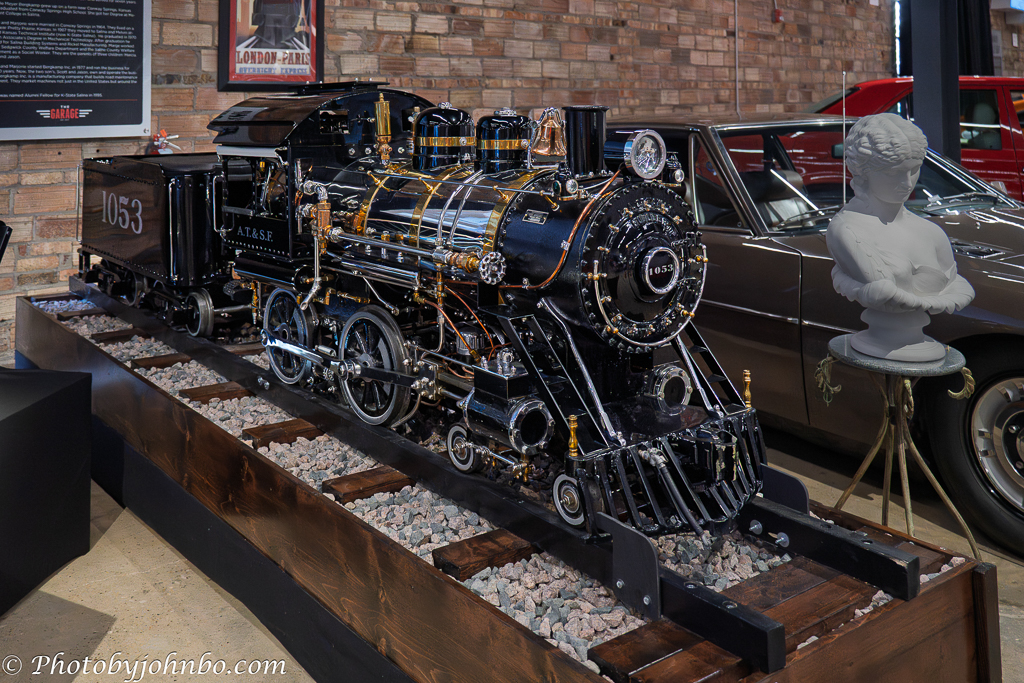
My first example features a beautifully designed, garden‑sized steam engine built in 1949 on display at The Garage Automotive Museum in Salina, Kansas. This recreated beauty felt cramped in its allotted museum space, lit with flat, even lighting, and the original RAW file did nothing to help it stand out. I couldn’t move any closer because of the stanchions and webbing in front of the display, and my attempts to crop by zooming in didn’t satisfy my desire to share the display in its entirety. Shooting from the opposite angle introduced even more distractions than the angle I chose.
When the lighting doesn’t cooperate, and the subject lacks defined space, post-processing masking becomes your friend. This photo ultimately became a Lightroom Classic edit. I used a subject mask to select the engine, then added a minimal amount of texture and clarity and adjusted the tone settings to bring out the metalwork. To further isolate the subject, I duplicated and inverted the engine mask, and applied subtle darkening and softening of the background. I also applied an object mask to the bright white sculpture that was pulling my eye away from the engine. By gently lowering the whites and highlights on the sculpture and reducing its texture and clarity, I was able to de‑emphasize the bust and keep the focus on the engine where it belongs.

Vary Your Subject Placement—Letting Reflections Tell the Story
Sometimes an environment presents special challenges to photographers. On one tour, our driver handled the guide duties while we were on the bus, but at each attraction he turned the commentary over to the site’s docent. During our drive along the Caribbean seashore, he entertained us with stories of his home island, Grand Cayman. Sitting several rows back, I noticed him reflected in the interior mirror he used to monitor the passengers. That mirror gave me the perfect opportunity to capture a candid moment and later compliment him in my post on his skill as a guide while keeping us safe.

Selective Focus—Creating Depth When the Lens Won’t
At the Tucson Wagon and History Museum, I shot this image through an open overhead door. The volunteer was scraping old paint from a wagon wheel. He was standing in the shade of the building while the background behind him was sunlit and bright, so I set my exposure to f/5.6 to soften the background and used a 1/500 shutter speed to keep the highlights from blowing out. Even so, the background in the original image was almost as sharp as the worker.
For this challenge, I experimented with Lightroom’s Adaptive Blur preset. It blurred the background nicely, but it also made the subject look like a cardboard cutout. To fix that, I created a subject mask, increased exposure and shadows, and then added a touch of clarity and texture to restore dimensionality. Finally, I lightly brushed over the gravel in the foreground, tweaking its texture and clarity to match the softer look of the blurred background.

Use Negative Space—Giving Emotion Room to Breathe
One of the most poignant museums I have ever visited is the Oklahoma City National Memorial & Museum dedicated to the victims affected by the bombing of the Alfred P. Murrah Building. Unlike the unpredictable chaos photographers typically face on historical excursions, museum tours, or busy outdoor sites, this display offered a rare gift. The exhibit paired a pristine, monochrome white ceramic sculpture with a placard describing the Pulitzer Prize–winning photograph of firefighter Chris Fields carrying one‑year‑old Baylee Almon. Together, they created a ready‑made composition—a single emotional moment distilled into form and light.
Because the sculpture is a single, kiln‑fired white form free of distracting color, the gallery lights naturally carve out sharp highlights and deep, emotional shadows. The museum provided the perfect isolation and negative space—my only task as a photographer was to find the exact place to stand. By aligning the lens to embrace that emptiness, the composition gives the profound weight of the first responder and the child the room it needs to truly breathe.
Working through these four very different subjects in light of Patti’s challenge reminded me how much intention even simple compositions require, and how each scene demands its own approach. While assembling the set, I also made sure none of the images had appeared in a previous Lens‑Artists Challenge—in fact, the two Lightroom edits come from museum visits currently scheduled for upcoming posts. You can view my challenge response images in 2K HD—and see the metadata for each—in my Flickr gallery here.
Last week, Tina hosted the Rule of Threes challenge, focusing on the power of an odd number of subjects in an image. Next week, Sofia takes the lead with a new challenge that goes live on Saturday, June 13, at noon Eastern Time. Be sure to follow her here so you don’t miss her challenge post.
If you’re sharing a Lens‑Artists Challenge response for the first time, welcome—we’d love to visit your post. To participate, publish your take on this week’s theme, link back to this page, and add the Lens‑Artists tag so others can discover your work. You’ll find more details on how the challenge works here.
John Steiner


That reflection shot of your driver is a great spot John, and shows what can be done if you’re on the alert for good photo ops! And as always I like the detail you provide on your editing processes.
Thanks, Sarah! It was truly spur-of-the-moment.
Great examples for this challenge John. I like how you educate as you describe your processing of the photos.
Thanks, Anne!
The museum piece is very somber and beautiful and I also love what you did with the wagon wheel photo!
Thanks, Nora! That was a fun edit. I don’t often use the Adaptive Blur tool.
John, each one of these illustrates the techniques beautifully. My favorites are the train and the man working on the wheel.
Thanks, Beth! That train edit is one of the longer edits I’ve done (short of those day-to-night conversions.) >grin<
Lovely choices John and very well-explained. The rescuer statue from the Okla City museum is very touching and you treated it perfectly
Thanks, Tina! That’s my favorite photo of the visit to the museum, and so striking in its sadness. The museum made the composition an easy lift.
Great tips. The photo of your driver and tour guide is outstanding! 👏 Great to see your post. It reminded me of how much I always enjoyed them.
Thanks, Dan! This was a fun challenge.
Great collection John! I really like the wagon wheel that the man is working on!
Thanks, Pamela. Using that adaptive focus made the worker stand out, unlike the original photo that will be included in the story of the museum in an upcoming post.
I really enjoyed reading through your processing on these images John. All the pictures have benefitted from the time you’ve spent on them. I find myself shooting more and more with post processing in mind. I deliberately underexposed a few images today so that I didn’t blow the highlights. Old problems like increasing shadow areas introducing noise are no longer such a problem with noise reduction in Adobe products or Topaz
Thanks, Steve.
Processing tools are so much better than they were even just a couple of years ago. I’ve been looking at older photos to rescue them with new processing techniques.
Your posts are so educational when it comes to the lengths you go to while processing. You really know what you’re doing.
Thanks, Sofia! It took me a long time to get accustomed to processing, but the added power of masks made things easier, though it seems they are more complicated. If that makes any sense. >grin<
Beautiful pictures of the model steam engine, John! That and the picture of the tour guide in the mirror are my favorites!!
Thank you, Sylvia!
Wonderful explanations of your thought process and techniques. For me the images that stand out are the driver and the volunteer. Masterful techniques, John. Really outstanding!!
Thanks, Patti!