November 2025.
Fargo, North Dakota.
Since Luminar Neo introduced its photo restoration module, I’ve been experimenting with old family snapshots. The AI does a fine job of repair and colorization, but its palette often leans toward beige and sepia. That doesn’t mean you’re stuck with those tones. Neo’s AI may generate the colors, but the real artistry comes from the editing tools at your fingertips. Neo isn’t just about automated restoration; it’s a complete creative suite. Sky replacement, color grading, and tonal adjustments allow you to push beyond the AI’s choices. Think of the restoration as a foundation, and the editing tools as your digital craftsmanship. Historical fidelity is one option, but artistic reinterpretation is another.

The original print suggests a wide crop—wider than 16:9, even with part of the right edge missing. That’s not typical for casual snapshots of the time. While the negative likely came from a 120 roll-film camera, it’s worth noting that such cameras weren’t exotic back then. Models like the Kodak Brownie series were inexpensive and everywhere—simple tools for everyday photography. Today, the term “medium format” might evoke high-end digital systems, but in the mid-20th century, it simply meant bigger negatives and better detail. The panoramic feel of this print likely came from a deliberate crop, either by the photographer or the lab, to emphasize the scene’s horizontal sweep.

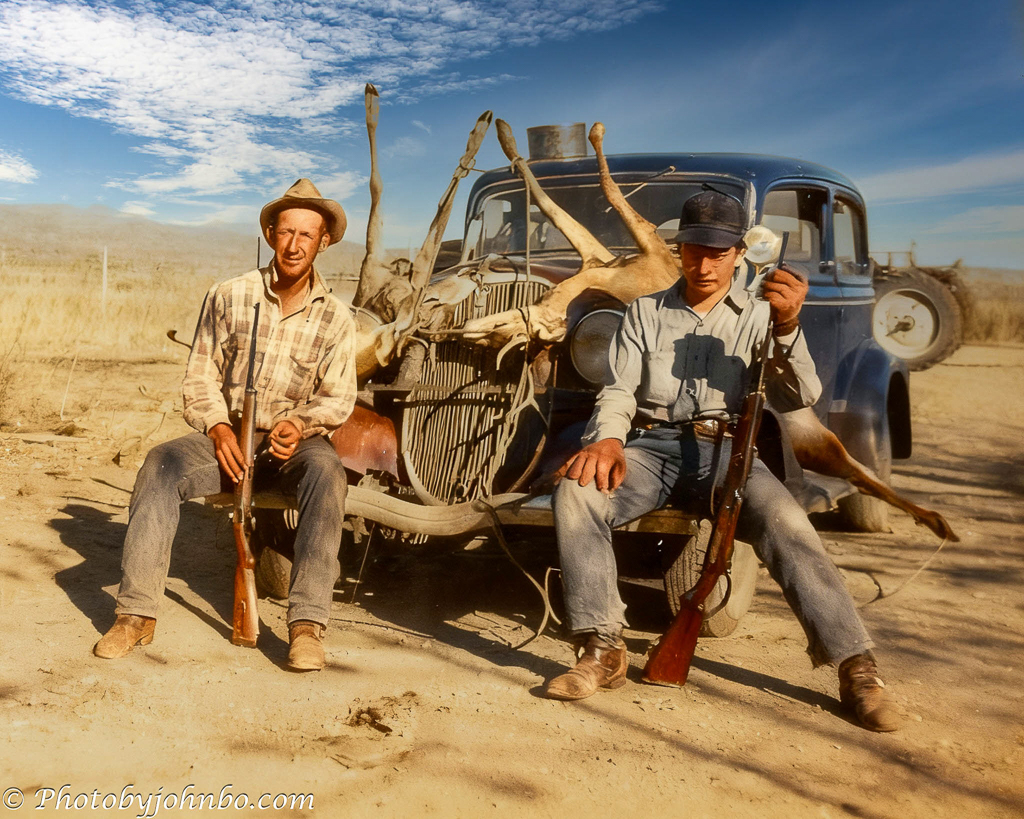
For my own interpretation, I chose a crop more typical of the era, framing only the hunters. The shack provides context—a rural North Dakota scene, but it draws attention away from the subjects: my Uncle Henry on the left and an unidentified friend. By narrowing the frame, the photograph feels more intimate, more about the men than their surroundings. Once exported to its new size, I dropped the image into Luminar Neo’s Restoration module, where the AI began repairing cracks, smoothing grain, and rendering color into the faded print.
Next, I moved the image into Luminar Neo’s Edit module to add a sky replacement. Other refinements included removing the telephone pole that had “faded into” the sky and applying a radial fill to boost contrast and clarity in the terrain behind the car’s left side.

While I explored the artistic side of the restoration, I also turned to AI to research the era in which the photo was taken. The automobile in the background became my reference. Its grille stood out as distinctive, and after some digging, I found a match: a custom car restoration company showcased a replica grille for a 1933 Ford Model 40, complete with the identifying badge. That discovery opened the door to further searches, which revealed several photographs of 1933 Fords with identical coachwork. I later found, while watching a Mecum Classic Auto Auction, that 1932 and 1934 Fords also have the same grille design.
The car wasn’t the only revelation. The positive identification of the 1932-34 era Ford Model 40 grille ruled out any date before the mid-1930s. However, the subsequent photos (taken in 1945 during WWII) show a slightly younger Uncle Henry. By comparing his appearance in the hunting scene to his confirmed wartime image, the timeline comes into sharper focus: his marginally older appearance effectively anchors the hunting scene to the post-war period, making it almost certainly from the late 1940s.

My next choice for restoration is another photo of my Uncle Henry (left) and an unidentified colleague standing before a historic B-24 Liberator. My nephew keeps a suitcase of memorabilia inherited from my brother, filled with photos and artifacts from Uncle Henry’s military service. The best clue to this image’s date isn’t visible in the photo itself but written in pen on the back: “Philippines.” Using Gemini, I extracted historical information about Uncle Henry’s WWII service. His dog tag number and uniform patches place him in the Philippines in 1945.
Gemini AI confirmed several details:
Amphibious Engineer: Confirmed by the ESB/Seahorse patches. His primary role was logistics and beachhead operations.
7th Cavalry: Confirmed by the DUI pin. This means he was attached to or served directly with the 7th Cavalry, which fought as dismounted infantry, during one or more of the major Philippine landings (Leyte or Luzon, 1944–1945).
The plane belonged to the 90th Bomb Group, which moved to McGuire Field, Mindoro, Philippines, on January 26, 1945.
The plane was active there until it was recorded as being salvaged in the Philippines in June 1945.
Taken together, the most likely location for the photo is McGuire Field, Mindoro, during the first half of 1945. Uncle Henry wasn’t part of the 90th Bomb Group, so the image is probably a coincidence—a moment where soldiers shared space with an aircraft that carried its own war record, complete with striking nose art.

At first glance, the restoration looked impressive, but I wanted to correct a colorization error and bring more life to the historic nose art. The first issue jumped out immediately: the man on the right was leaning against the aircraft with his fist pressed to the fuselage. His white wristband confused the AI, which interpreted his hand and forearm as part of the painted design. It’s the kind of slip that seems minor but quickly undermines the image’s authenticity. Errors like this are relatively common in automated restoration, and I discovered that correcting them requires a more deliberate approach.
I’ll admit, I don’t have the technical chops to manually colorize a section of an image in Luminar Neo or Lightroom Classic. Nor am I fluent enough in Photoshop to pull it off. So I asked Gemini AI how to tackle the correction, and what came back was a complete step‑by‑step guide: the tools, the edits, the workflow. As the young people say, I was gobsmacked—completely blown away.” >grin<
I loaded the Neo‑restored version into Photoshop and, working at 200% on a new layer, began following Gemini’s instructions. I knew the black‑and‑white area of the hand and arm also contained a shadow that would fall across the aircraft, so I did my best to sculpt a fist and thumb using colors sampled from the upper arm. Different blend modes and adjusted visibility helped me bring the hand back into the image. The results of this edit are in the image below. It’s not perfect, but it represents the best of my ability—and a step toward learning the craft.
Finally, in researching the Queen Mae, Gemini surfaced a color photo of the nose art. That image—copyrighted, but invaluable as a reference—showed the lady draped in a red cape. Following Gemini’s step‑by‑step process, I found colorization far easier than manual restoration of the hand. The method also involved adding a new layer, sampling the nose‑art red from the reference photo, and blending so the cape’s folds and shadows remained visible. As a final touch, I returned the colorized image to Luminar Neo for a sky replacement, completing the restoration with a more vivid backdrop.

From Henry’s suitcase, I discovered another image: a portrait of Uncle Henry posed against a tropical backdrop. The exact location in the South Pacific—Leyte, Luzon, or Mindoro—can’t be determined, but the lush scenery firmly situates the photo within his WWII service, between 1944 and 1945.

After dropping the scanned image into Neo’s Restoration module, the original image took on a vintage color appearance that didn’t require any repair or display colorization errors, unlike the Queen Mae photograph.

For this restoration, I chose only to crop the image differently from the original. By removing a large portion of the light‑colored foreground, I eliminated a distraction and brought the focus closer to Uncle Henry. The tighter framing provides a more intimate view of the subject, allowing his presence to stand out against the tropical backdrop.

In the end, this project became more than just a technical exercise. The restoration tools gave new life to faded prints, while AI research fixed the images in their time and place. Together, they revealed both the artistry of the original photographs and the stories behind them—from Uncle Henry’s hunting trip in rural North Dakota to his wartime service in the Philippines. I’ve upscaled the images and put them on my Flickr site here for those who want to take a closer look.
As we look to the future, I hope you find time to reflect on the stories of the past. Happy New Year!
John Steiner
 Journeys with Johnbo
I bet ya got two of those sons a bitches an hour after sunrise 🦌
My uncle and his friend were probably out pretty early on their hunt.
These are so good Especially the first two.
Luminar Neo’s Restoration module did all the heavy work. I just used the other tools in the kit to enhance the final images. Thanks, Ritva!
Well done, John! You have a great deal of patience. It’s almost as if you brought your Uncle Henry back to life.
I only wish I’d known him when he was alive. I’d met him, of course, but I never had a chance to hear the story of his WWII record.
😎
I agree with Anne. Well done John!
Thanks, Brad!
Congratulations on such meticulous work! Well done!
Thanks, Egidio! It was a fun task researching my uncle’s WW II service after discovering those old photos, as well.
Excellent work!
Thanks, Nora!
Love the first image of the old car in the dusty dry land. It’s a classic.
Thanks, Vicki! It is truly a slice of early-20th century America.