
May 2025.
One class of photography that I seldom try is intentional camera movement (ICM), but this week, Anne challenges us with a subset of ICM, intentional zoom while making an exposure. She writes, “In this technique, you adjust the focal length of a lens to change the magnification of the subject, giving the appearance of moving closer or further away without physically changing the camera’s position. This is achieved using a zoom lens, which has a variable focal length.” You can find her challenge post here.
The most vibrant effects are of lights at night, but I decided to work with daylight scenes for this challenge. On the day Anne published the challenge, we visited Hanalei, on the island of Kauai, Hawaii. I decided to try the technique using my Nikon Z7 II while walking around the shops and stores. Many worthless photos hit the bin, but I did get a few to share. My opening photo features a sign on a storefront. This photo was taken at 1/15 second and f/8, using a 28-400 mm zoom lens. Of course, with a short exposure time, there was no way that I could rotate the lens to its full range before the exposure stopped. The metadata on the photo tagged the lens at 28 mm, which was the setting when the exposure started.

I noticed a store window display featuring a hibiscus-print dress as we walked by. This exposure was at 1/10th of a second, lens at f/8. I was standing back from the display, so my zoom started at 220 mm. My rotation speed must have been slower on this exposure, as the zoom isn’t quite as noticeable. The large hibiscus in the center is sharpest, and the other flowers on the periphery show the motion blur effects due to the zoom.

I found a live hibiscus blossom in a nearby public garden and took the photo at f/22, 1/10 second, ISO-64. This zoom started at 58 mm. One of the things I noticed from my many failed shots is that I couldn’t hold the camera steady enough to maintain a sharp image in the center and rotate the lens. A tripod would have helped, but I didn’t bring one along on our flight to Hawaii. That problem was exacerbated by the warm Hawaiian trade winds that kept moving the flower in the breeze.

While enjoying a cocktail, I thought about the project and got an idea: I would experiment with a composite image. I captured the flower at 1/250 seconds and f/22 in bright sunlight. I then created the zoom exposure. That exposure at 1/10 second and f/22 became the background layer. In Luminar Neo, I added the sharp flower image as a layer, used Neo’s masking to remove the background, and sized the blossom layer to cover the blurred flower in the background layer. I like the result, but thought I’d add one more step before calling it complete.

I added a brush mask to Neo’s Blur tool on a copy of the composite image. Using the Motion Blur setting on the tool, I then brushed each petal outward to the edge of the petal to slightly blur the petals while leaving the flower’s center and stigma untouched. This exposure solved my problem of the wind causing the entire flower to motion-blur during the slow zoom exposure.
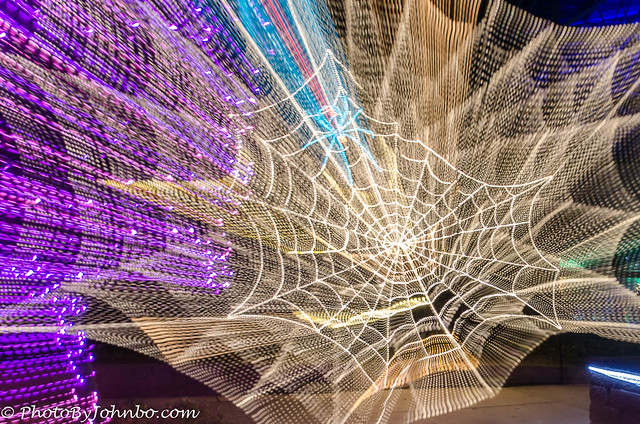
For my final image, I found a photograph taken in 2015 at a holiday light display in Albuquerque, New Mexico. The light display was of a spider web. The zoom effect is my best example of the ICM zoom technique. It was taken with a Nikon D7000 at 0.5 seconds and f/3.5.
Thanks to Anne for making me reach outside my usual pattern to attempt ICM, something I haven’t done since that night in 2015 when I tried the technique on a couple of LED light displays.
Last week, Tina hosted “The First Thing I Thought Of” challenge, and reading everyone’s humorous responses was enjoyable. Next week, Ritva will host. She will post her challenge at noon Eastern Time on Saturday. Be sure to follow her here so you don’t miss her challenge post. Check here for more information on joining us in your challenge response.
John Steiner
 Journeys with Johnbo
I adore the hibiscus flower layered over the zoomed image. It pops!
Fascinating. I always wondered how this effect was accomplished.
It’s a cool effect and simple to do.
Great approach to your zooming images, John! I really like the end result of the Hibiscus!
Thanks, Donna! I don’t know if it was my idea, or the cocktail I had. >grin<
John, these are all amazing. I love the fish sign! I like all of the Hibiscus ones, especially the final one. Did you take notes on your settings?
I upload my photos to Flickr and put them in an album. The metadata for camera settings is available there, so it’s a quick reference when I want to check my settings.
Lightroom would show me that, as well, but it’s more complicated to get to the settings.
Very good John. the layering is great
Thanks, Brian!
Your interpretation of this challenge was worth waiting for John! I enjoyed all your various attempts at zooming. They are all creative in their own way. I also appreciate the effort you put into processing. My favorites are the two last ones.
Thanks, Anne! It was fun doing something fresh instead of from the archive!
I’m glad you enjoyed the adventure John!
Excellent series. The fish image is great, and fun, and the web … wow!
Thanks, Keith! I was pleased how well the fish image turned out.
I don’t use a tripod so would have the same problem as you. I really like your solution with that hibiscus flower, it works so well and is something I may try one day
With processing tools these days, it’s not too complicated to accomplish. I might just try some more of these. Though I did see others achieve the effect with a filter in Photoshop. I bet Elements has it, also.
I’ll have to check. I’m away at the moment so don’t have access
Great photos and ideas, John. I seldom do composites. So, to create the same effect you did with two images, I have used Luminar Neo to isolate my subject and then add motion to the background. It often works well.
Luminar’s layering makes it easy. I like its simple approach to manipulating layers.
I love the two composite hibiscus images John and amazed at your skills with photo processing.
Thanks, Brad! I spend way too much time in front of the computer with editing software. >grin<
As long as you enjoy it.
Love the spider web zoom. Now that image shows something really different and intriguing.
Not sure I have your patience or skill with editing software to achieve your results, but I found your descriptions of the process interesting anyway.
Thanks, Vicki!
I like what you did with your editing, John. That takes imagination and skill and your end results are awesome. My favourite is the last one, fantastic shot!
Thanks, Sofia! This was a fun project and as we are getting ready to leave Hawaii, it will be a good reminder of our stay.
Some nice ones here John . I like the opening shot, but I am really impressed with spiderweb, just wow.
That spider web turned out amazing. I was surprised when I got it loaded into the editor.
Yes it did 😀
Stunning pictures and great narrative as always, John! I love the combination of ‘Hibiscus’ in its natural and artistic form. And the spider web is indeed “just wow”. (Nothing to add to Ritva’s remark;))
Thanks, Yanaj *
Your idea of combining the well-focused flower in the center of the zoom was great John, very creative and that image is may favorite except for the last which is gorgeous. I also loved your opener.
Thanks, Tina! This was a fun challenge that required me to get some new photos!
You took it to another level 😀. Great pics.
Thanks, PR!
Great use of photo program tools! Interesting photos.
Thanks, Rebecca!