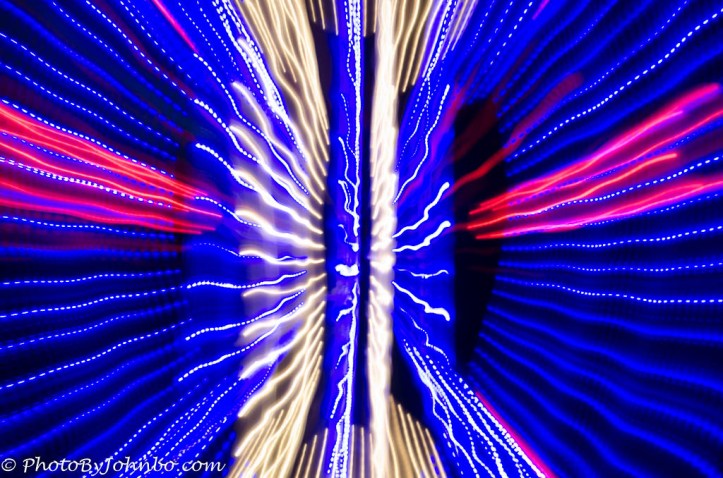
This week, Ritva is an outlaw and tells us we should sometimes break the rules… photographically speaking, of course. She writes, “We work so hard to learn the photography rules, at least I do, but now it is time to BREAK them!! The problem is just that in order to break a rule, you must know that there is a rule in the first place!” You can read her entire challenge post here.
In my opening photo, I set a slow shutter speed (0.3 seconds) and rotated the zoom lens on the camera during the exposure. The image was a display of LED lights. Four rules were broken: use a tripod for slow shutter speeds, don’t rotate the zoom during exposure, overexposure of highlights due to slow shutter speed, and the subject being centered instead of the Rule of Thirds.

My following example of rule-breaking is splitting a photo into two parts. I did this in post-production, creating two new images from the single image of a classic Buick front end. Above is the photo’s left half, and below is the right half.

I printed them on separate sheets and mounted them in cheap poster frames. The framed prints flanked a window for a campy effect.

I came up with this idea because the window dominated the wall. There wasn’t enough wall space on the right to put anything of any size on it, and on the left, the wall seemed to go on forever. I thought something symmetrical would set off the window.

On a jungle cruise in Costa Rica, I had a poor seat for the unfolding scene. Our tour guide hopped out of the boat with some raw chicken and fed chicken parts to the croc. How’s that for breaking a rule? Well, not to be outdone, I broke a rule, also. Given the crowd blocking my shots, I cropped the image as tightly as possible and used a positive vignette to white out some extraneous distractions (the edges of people’s bodies). Today, I’d use AI to remove people from a scene.

Broken rules: Hold the camera still and use the correct shutter speed to stop action. If you intentionally choose a slower shutter speed and move the camera with the subject, you’ll get a sharp view of the subject and a greater sense of motion because the background is blurred in the final image. The wind-blown hair on the rider and the horse’s mane prove that the horse and rider are at top speed.

Rules broken: Use the correct speed to stop action or put the camera on a tripod. In this case, I used a slow shutter speed to create a motion blur and to properly expose the shot. The impact of sparks in the wine glass and the motion of the flames in the immediate foreground balance the effect.

Many years ago, I discovered Copper Peak, an abandoned ski jump near Ironwood, Michigan, and climbed to the top to view the surrounding terrain. When I climbed back down, I tried to get a photo of the entire structure. As of this week, the ski jump is still unused but has become a tourist attraction. Visitors can now ride to the top for a commanding terrain view. Rule broken: Hold the camera level. The tilt allowed me to photograph most of the structure, as I couldn’t back up to level the camera further.
Thanks to Ritva for a challenge that made me think about why I break some of photography’s “rules.” Last week, Sofia hosted the theme of Cinematic. Next week, it’s Egidio’s turn to host. Be sure to follow him here so you won’t miss his challenge when he posts it at noon Eastern time in the United States. If you’d like to join in with a challenge response but aren’t sure how to get started, check here.
John Steiner
 Journeys with Johnbo
These are fun images John. I especially like the first and last ones!
Thanks, Brad!
My pleasure.
I’m glad you broke the rules in all of these John and I especially love the way you captured the sparks dancing out of the wine glass 😊
Thanks, Xenia!
Cool post, John. My favourite has to be the last one, that angle truly gives an idea of height. Also love the effect on the first one, I’ll be trying something like it myself.
I did several of those zoom effects when we were at a night LED light display at a city park. It’s a great place to try the technique.
John, I enjoy your creative thinking with the car and wall art. 10 + for sure. I also like the shot of the swordsman. You break the rules so well
Thanks, Ritva! That split car project was a fun and useful trick.
John, well done! I love the swordsman!
Thanks, Beth. That’s one of my favorite panning shots. It turned out so well.
Great job, John! So many exceptional shots of breaking the rules.
Thanks, Donna!
Great rule breaking John! I love the fire effect in the bar picture.
I admit to not knowing how it would turn out. The sparks in the glass were so much weaker than the other elements. They turned out far better than I expected. A lucky guess at exposure.
So much of photography, at least in my case, is luck!
Well done John! I especially love what you did with the car – really creative and looks great on the wall. You also did a wonderful edit of the croc. What a crazy idea that someone would jump into the water with those beasts!!!
Thanks, Tina! I have more photos of the guy standing next to the croc. I’m sure this croc was always there waiting for the tour guide to bring him a snack.
Your vignetted croc works very well and I love the first shot as well as the motion in the Swordsman 🙂
Thanks, Sarah! This was a fun challenge for me to respond with those lucky choices.
Love the Buick and ski jump!
Thanks, Sandy!
Well, John, you have now earned the distinct title of Mr. Outlaw! Great images and explanations.
Yes, I’m such a renegade, taking pictures and breaking rules. >grin<
Great examples John and an interesting read. The LED shot was a successful experiment, I’d have been pleased with that. The cars really work for me as well, great idea. I used AI in photoshop this week to remove a car from a landscape. I used the generative AI feature, which I’ve not used before. I was blown away by the results. It took out the car and filled in a dust track just as if the car was never there!
I’ve used Generative Fill on several occasions to remove road signs from landscape shots, remove cars from backgrounds, and other things. It’s usually quite good, and one of the three options is better than the others. I’ve only had a few times when I had to crop out the offending thing, or leave the object in.
Great photos. Love that old Buick!! We had a black ‘53 in my youth. 👏
A college friend had a ’56 Roadmaster inherited from his grandfather. He always called it the “RoadToaster.”
Thanks, John
I learned what campy art is – and it worked so well here
Thanks, PR! I had fun creating those two posters.
John
hi This is Yvette and not PR
Sorry. I was confused!
oh no worries
Nice post
Thanks!